This writeup documents my Ansible-based reverse proxy automation and the demo video where the playbook runs end-to-end.
Resources
- Code: https://github.com/Rhythm1337/ansible-dynamic-proxy
- Demo video: https://www.youtube.com/watch?v=FrCaie-2YKk
- Handwritten notes (PDF): https://github.com/Rhythm1337/ansible-dynamic-proxy/blob/master/Handwritten.pdf
The Problem
The goal was to obfuscate a public-facing business server located on-premise. This server runs multiple different applications and generates both inbound and outbound traffic. To date, approximately 20 TB of bandwidth has been transferred.
The Solution: Reverse Proxies
NGINX was chosen as the solution because it offers built-in load balancing, performance optimization, and flexibility.
The Technical Setup and Thought Process
The infrastructure is split between a public Cloud Proxy and an isolated Home Server.
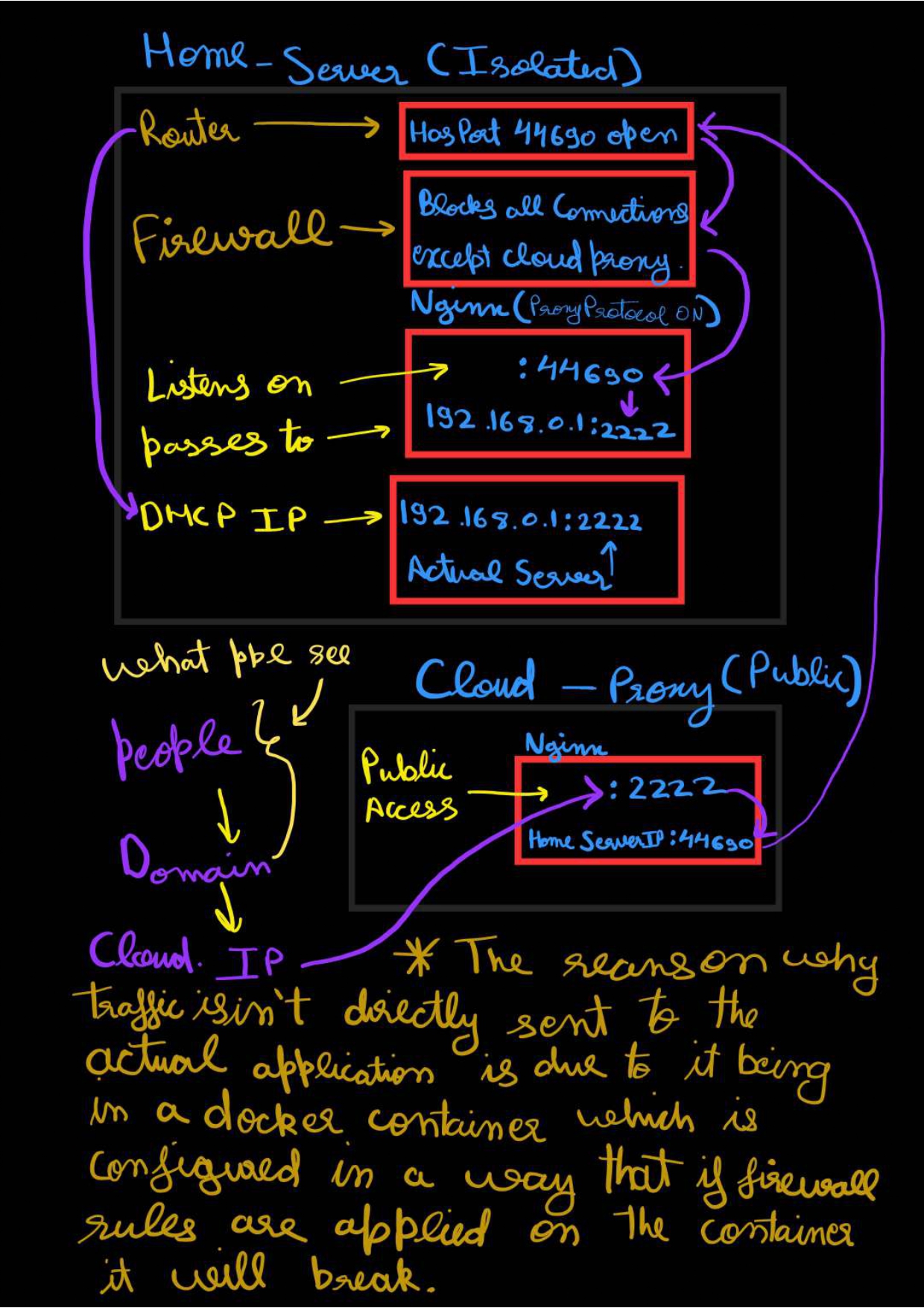
Cloud Proxy (Public)
- Handles public access via the domain and cloud IP.
- Runs NGINX.
- Traffic is directed from port 2222 to the Home Server IP on port 44690.
Home Server (Isolated)
- Router: Port 44690 is open.
- Firewall: Blocks all connections except for the Cloud Proxy.
- NGINX: Proxy Protocol is enabled. It listens on port 44690 and passes traffic to the internal DHCP IP 192.168.0.1:2222.
Note on container security: Traffic is not sent directly to the applications because they run in Docker containers. Applying firewall rules directly to these containers would cause them to break. Using the same ports on both the Business Proxy and Home Server is an intentional choice for obfuscation.
Addressing Dynamic IPs with Ansible
Because the machine is hosted on-premise at a business location for security reasons, a static IP was not possible. The IP address changed frequently, creating a connection issue. The solution was Ansible, an open-source automation tool used to automate various IT processes.
The Automation Approach
- Environment setup: Configure SSH keys and develop the Ansible playbook.
- On-premise execution:
- Gather facts from the on-premise machine.
- Retrieve the current IP address and save it as a fact.
- Cloud Proxy execution:
- Gather facts from the Cloud Proxy.
- Ensure all necessary packages exist.
- Retrieve the saved IP of the on-premise machine.
- Update all configuration files with the new IP.
- Reload NGINX to apply changes.
Key detail: The playbook is designed so that if the proxy machine is ever changed, no extra setup is required beyond configuring the SSH keys.
Closing Note
“If you have read this far, thank you from the bottom of my heart for sticking with me. I truly appreciate you being here.”